
My AI-Built App Just Got Smarter: Adding Live Data in Chapter Three
One of the most satisfying moments when building software is when an application starts interacting with the outside world.
That’s exactly what happened in the first part of Chapter Three of LinkedIn Learning’s OpenAI Codex 101: From Idea to Deployed App.
By the end of Chapter Two, I had a working application that allowed users to add, edit and delete links. It looked considerably better than the version I started with and, more importantly, it was deployed online.
But all the links still looked largely the same.
The application stored a name and a URL, but it didn’t really know anything about the websites being added.
That was about to change.
Moving Beyond Basic Links
Most modern link-sharing tools do more than simply display a URL.
When you paste a link into them, they often show additional information such as:
- A title
- A description
- A preview image
This makes links easier to recognise and gives users much more context before they click.
The first challenge in Chapter Three was teaching the application how to gather and display that information automatically.
First Results
After making the first set of changes, the application was able to collect additional information from websites and display it alongside the saved links.
At this stage the feature was working, but the presentation was still fairly basic.
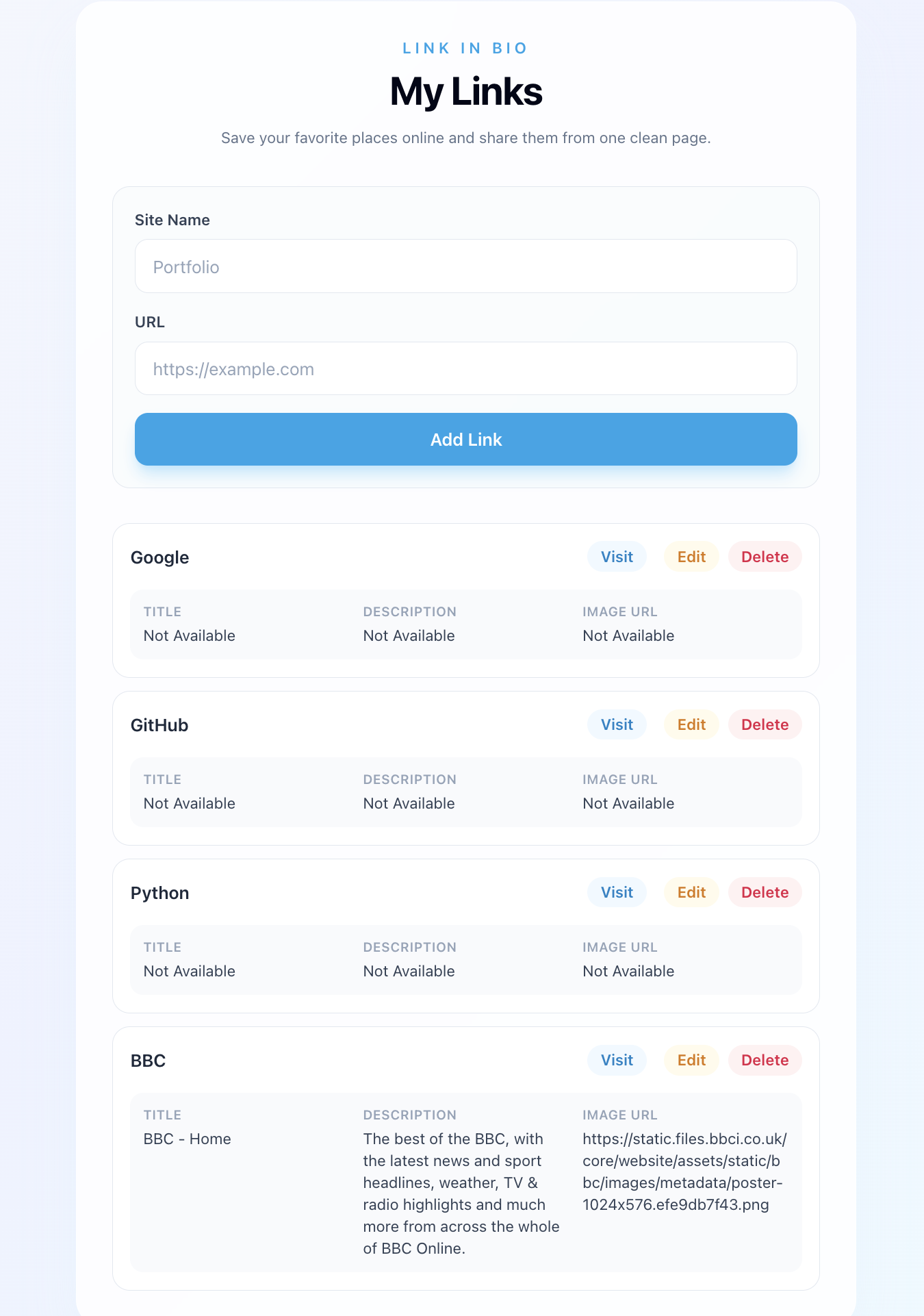
What interested me most was seeing the application behave differently depending on the website.
Some sites provided useful information.
Others provided very little.
The application had to cope with both situations.
As someone who spends much of their day working with data and information sources, I found that surprisingly interesting.
Making The Results More Visual
Once the information was being collected successfully, the next step was improving how it was presented.
Rather than displaying raw data, the application started turning links into richer content cards.
The difference was immediate.
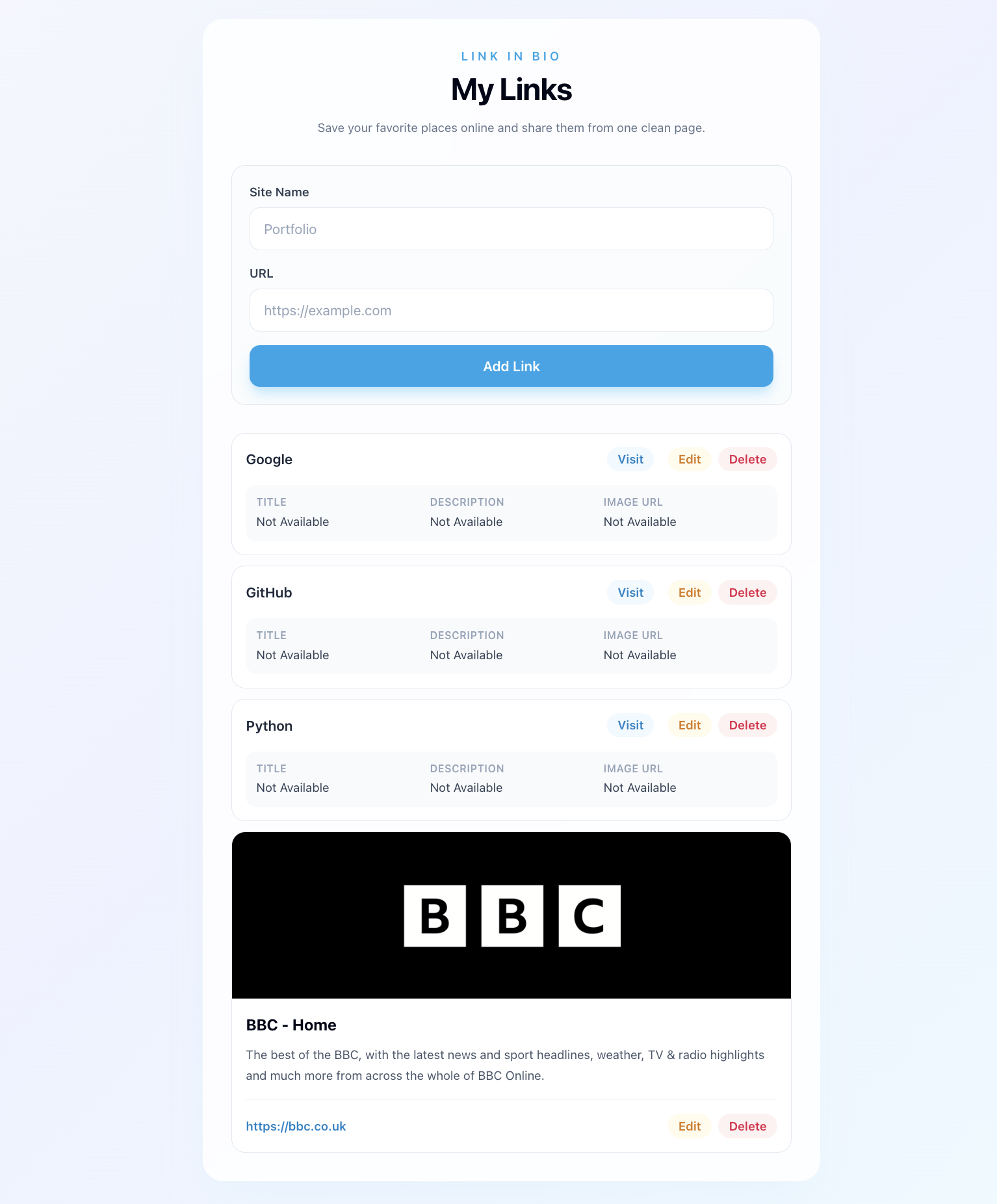
The same feature presented in a much more user-friendly way.
At this point the project began feeling less like a coding exercise and more like a genuine product.
Links were no longer just lines of text.
They carried context.
They looked different from one another.
And they provided useful information before a user clicked on them.
What I Learned
The biggest lesson from this part of the course wasn’t really about the technology itself.
It was about iteration.
The application didn’t leap from a simple link manager to a polished experience in a single step.
Instead, it improved through a series of small changes.
First the data appeared.
Then the presentation improved.
Each stage built on the previous one.
That’s becoming a recurring theme throughout this course.
The AI helps generate the code, but the real skill lies in reviewing the results, deciding what to keep and gradually shaping the application into something useful.
Looking Ahead
By the end of this section, the application was beginning to feel far more intelligent than the version I finished Chapter Two with.
It wasn’t just storing links anymore.
It was starting to understand something about them.
And judging by what’s coming next in Chapter Three, this is only the beginning.
When AI Couldn’t Complete The Task: My First Encounter With MCP
One of the things I appreciate about the OpenAI Codex 101: From Idea to Deployed App course is that it doesn’t just show what happens when everything works.
Sometimes things don’t work.
That was certainly my experience during the second part of Chapter Three.
The goal of this section was to introduce MCP (Model Context Protocol), a system that allows AI tools to access external sources of information rather than relying solely on what they learned during training.
The idea is straightforward enough.
Instead of making decisions based on potentially outdated information, the AI can consult a live source of truth.
At least, that’s the theory.
Following The Instructions
I worked through the lesson and attempted to connect Codex to the external documentation source being used in the training.
Initially, everything looked straightforward.
The instructions were clear and Codex appeared to understand what I was asking it to do.
Unfortunately, reality had other ideas.
The task failed.
First Attempt At A Fix
After some investigation, I was advised to add additional domains to the Codex environment settings and then try again.
That seemed promising.
I made the changes and reran the task.
Nothing.
The same problem remained.
At this point I was beginning to discover one of the realities of software development: following instructions perfectly does not guarantee success.
Working The Problem
Rather than repeatedly trying the same thing and hoping for a different result, I started asking more questions.
Codex suggested various troubleshooting steps and explained what it believed was happening behind the scenes.
The issue appeared to be less about the code itself and more about connectivity and configuration.
In other words, the AI knew what it wanted to do.
It just couldn’t reach the information source it needed.
A Useful Conversation
Eventually I pointed out something that, in hindsight, seems obvious.
I only had access to Codex and GitHub.
Any solution needed to exist within those tools.
That changed the conversation.
Instead of repeatedly trying to force the original approach to work, Codex proposed an alternative.
It created a repository-level configuration and documented the setup process inside the project itself.
The original task remained blocked, but the project was now better prepared for future attempts.
An Unexpected Result
What I found most interesting was that the AI didn’t pretend everything was working.
Instead, it explained exactly what had happened.
It documented:
- What it had changed.
- What it had not changed.
- Why the task remained blocked.
- What needed to happen next.
As somebody coming into software development from a journalism background, I appreciated that transparency.
The explanation was arguably more useful than a silent failure.
What I Learned
The biggest lesson wasn’t really about MCP.
It was about troubleshooting.
When people talk about AI-assisted development, it’s easy to imagine a world where you simply type instructions and everything works automatically.
That hasn’t been my experience.
The workflow increasingly looks like this:
- Try something.
- Review the result.
- Investigate problems.
- Ask better questions.
- Adjust the approach.
- Try again.
That feels remarkably similar to reporting.
You start with a theory.
You test it.
You gather evidence.
Sometimes the answer isn’t what you expected.
So Did It Work?
Honestly, I’m not entirely sure yet.
The original objective wasn’t achieved during this part of the lesson, but the project now contains additional configuration and documentation designed to make future attempts more successful.
For all I know, everything is now set up correctly.
Teaching Codex New Habits: My Experience With Skills
The next section of LinkedIn Learning’s OpenAI Codex 101: From Idea to Deployed App introduced a concept called Skills.
The idea is simple enough.
Up until now, every instruction I’d given Codex had been tied to a specific prompt.
If I wanted something done, I had to ask for it.
Skills are designed to change that by allowing you to define reusable behaviours that can be applied automatically when certain situations arise.
In theory, this means you can teach Codex to perform repetitive tasks without having to remember to ask every time.
A Sensible Use Case
The example used in the lesson focused on keeping project documentation up to date.
That immediately made sense to me.
As the application has evolved through the course, new features have been added regularly. Remembering to manually update documentation after every change would quickly become tedious.
A reusable skill seemed like a logical solution.
Following Along
The process itself appeared straightforward.
The goal was to create a reusable instruction that would encourage Codex to update project documentation whenever significant changes were made.
At first, everything looked promising.
Files were created.
The structure appeared correct.
The expected components seemed to be present.
But then things started to diverge from what the instructor demonstrated.
When Your Results Don’t Match The Video
One challenge with learning software development through recorded training is that there isn’t an instructor sitting beside you when something unexpected happens.
When the demonstration on screen works perfectly but your version behaves differently, you’re left trying to work out where the problem lies.
Is the issue:
- The instructions?
- The configuration?
- The AI?
- Something you’ve done?
- Or something the course hasn’t mentioned?
Without experience, that can be difficult to diagnose.
That’s exactly what happened here.
Using The Expected Result As A Clue
Eventually I took a different approach.
Instead of repeatedly trying to fix the issue blindly, I used the instructor’s expected output as a reference point.
I captured what the result was supposed to look like and showed that to Codex.
Interestingly, once it could compare its output against the expected outcome, it was able to identify the differences and make corrections.
The issue was resolved surprisingly quickly.
What I Learned
The biggest lesson wasn’t really about Skills.
It was about troubleshooting.
One of the assumptions I had before starting this course was that AI-assisted development would involve less debugging.
What I’m discovering is that the debugging still exists.
The difference is that you’re often debugging:
- prompts,
- workflows,
- configurations,
- and AI behaviour,
rather than just traditional code.
The Missing Ingredient
The only thing I really missed during this exercise was the ability to ask an instructor a quick question.
An experienced developer might spot the issue in seconds.
As a beginner, it’s not always obvious whether something is genuinely broken or simply behaving differently from the demonstration.
That’s where AI has actually become surprisingly useful.
Even when Codex doesn’t get things right first time, it can often help explain what happened and suggest ways forward.
Progress, Not Perfection
Although this section didn’t go exactly as shown in the lesson, I still came away with a much better understanding of how reusable behaviours can be built into an AI-assisted workflow.
More importantly, I learned another lesson that seems to be becoming a theme throughout this course:
Getting something wrong isn’t necessarily a setback.
Sometimes it’s the fastest way to understand how it works.
Have I Really Built A Plugin? My Final Chapter Three Challenge
The final part of Chapter Three of LinkedIn Learning’s OpenAI Codex 101: From Idea to Deployed App was supposed to bring together everything I’d learned so far.
By this point in the course, I’d:
- Built a working web application.
- Added richer link previews.
- Experimented with MCP (Model Context Protocol).
- Created reusable Skills for Codex.
The final exercise aimed to package those pieces together into something reusable.
In theory, the result would be a plugin that could be used on other projects.
At least, that was the idea.
Bringing Everything Together
One thing I’ve noticed throughout this course is that each lesson builds on the previous one.
Earlier chapters focused on creating the application itself.
More recent sections have focused on creating reusable tools and workflows around that application.
This final exercise was designed to combine those pieces into a single package.
Rather than having separate configurations, separate instructions and separate tools, the goal was to bundle them together so they could be reused elsewhere.
Conceptually, that makes a lot of sense.
If you’ve solved a problem once, why not make that solution easier to reuse?
Following The Process
As with the earlier lessons, I followed the instructions and used Codex to generate the required files and configuration.
Unlike some earlier parts of the course, this section actually went relatively smoothly.
Files were created.
The structure looked sensible.
The expected components appeared to be present.
At first glance, everything seemed to work.
The Question I Couldn’t Answer
Then I found myself asking a question.
How do I know whether this plugin actually exists beyond my repository?
The course described it as something that could be installed and reused.
But as somebody learning this material for the first time, I wasn’t entirely sure how to verify that.
Was it publicly available?
Did it need publishing somewhere?
Was it simply packaged and ready for future use?
Or had I merely created the files that would allow it to become a plugin later?
I realised that I didn’t actually know.
The Difference Between Following Instructions And Understanding
This highlighted something I’ve encountered several times throughout the course.
Following instructions and understanding the wider ecosystem are not always the same thing.
I can follow a set of steps.
I can review what Codex generates.
I can deploy an application.
But there are still moments where I find myself wondering how all the pieces fit together.
That’s particularly true when dealing with concepts that are new to me.
A Familiar Feeling
Oddly enough, this reminds me of journalism.
You can obtain a document.
You can read the document.
You can understand what’s written inside it.
But sometimes the most important question is:
“What does this actually mean in practice?”
That’s how I felt at the end of this exercise.
The files appeared to be correct.
The structure appeared to be correct.
But I wasn’t yet certain how that translated into a real-world plugin that somebody else could install and use.
What I Learned
The most useful lesson from this part of the course wasn’t about plugins.
It was about confidence.
When you’re learning something new, it’s easy to mistake “I followed the steps successfully” for “I fully understand what’s happening.”
Those aren’t always the same thing.
This exercise reminded me that there’s still a difference between:
- Creating something.
- Understanding how it works.
- Knowing how to verify that it works.
The good news is that each chapter is gradually closing that gap.
Looking Ahead
Chapter Three has been one of the most interesting parts of the course so far.
Not because everything worked perfectly.
In fact, some of the most valuable lessons came from the moments when things didn’t work as expected.
I’ve learned about deployment, live data, troubleshooting, reusable skills and now plugins.
Whether my plugin is truly ready for the wider world remains to be seen.
But one thing is certain.
I now understand far more about how these systems fit together than I did when I started.
And that’s progress.